Administrators have the option to require users to reset their password at regular intervals. This option allows you to maintain these settings.
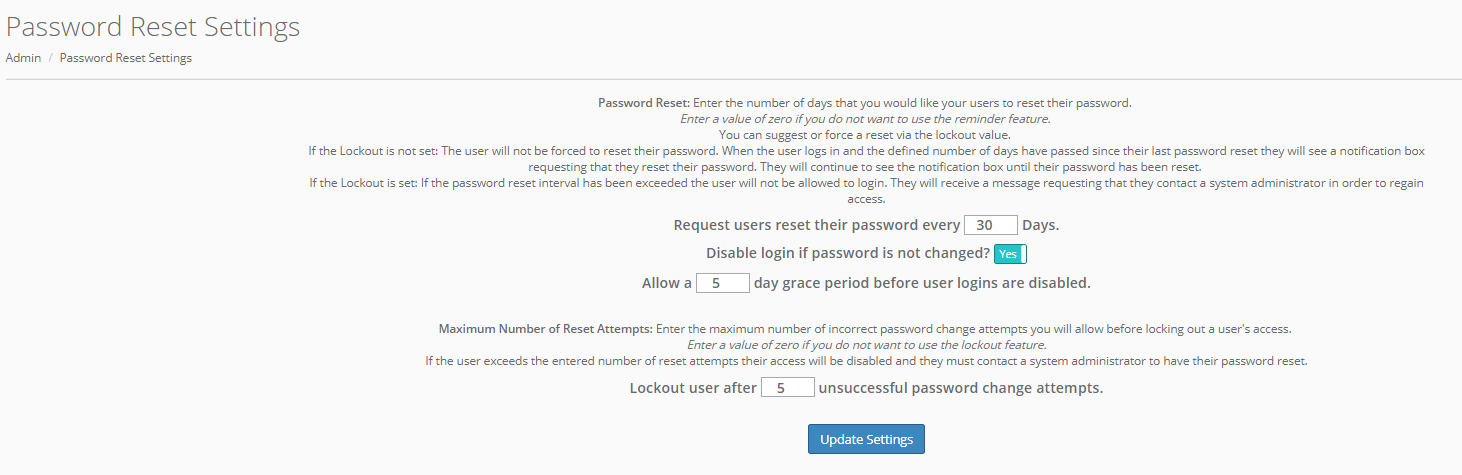
Enter the number of days after which you'd like to request users to reset their passwords. Note that you can turn this feature off by simply entering a value of 0 here.
You can choose to disable logins if passwords have not been changed. If you want user to remain able to log in even if they have not changed their password after requested, toggle this option to "No".
If you choose to disable login, you will be asked to enter the number of days allowed as a grace period before the logins are disabled.
Additionally, you have the option to choose a number of password change attempts allowed before a user's access is locked out. If a user unsuccessfully attempts this number of password resets, their access will be disabled and they will be prompted to contact a system administrator to reset their password. Note that you can turn this feature off by simply entering a value of 0 here.
Comments
0 comments
Please sign in to leave a comment.