Trade Invoices (and Vet Clinic Invoices) can be run from Financials > Invoices and Statements >Trade Invoices. Halcyon will show for each of your trade customers how many unpaid cases there are and how many cremations have been performed for them.

Invoices:
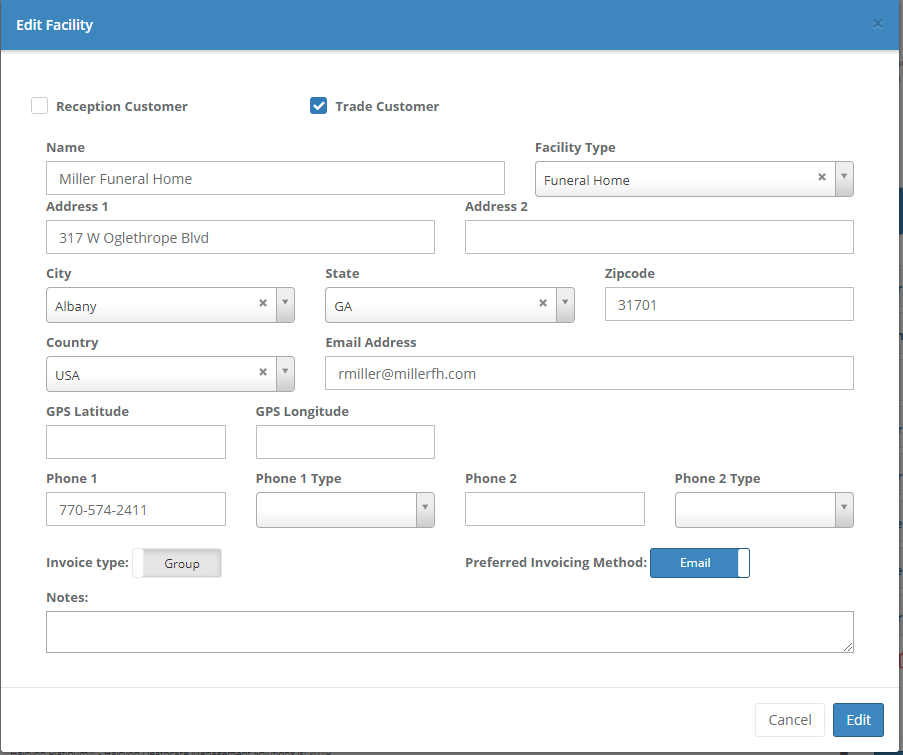
From here you can create invoices for one or more trade customers. The invoice format can either be individual cases listed separately or a grouping of all outstanding cases with a total. Go to Admin > Associated Facilities Maintenance> Maintain Associated Facilities to specify whether the trade partner will receive either Individual or Group invoices
The trade invoice includes all unpaid cases along with their details. It includes all cases that are unpaid regardless of their dates.
Emailing Invoices:
The invoices created will be PDF files that are either generated to your screen (for you to print) or emailed to the trade partner. You define how each trade partner's invoices are generated in Admin > Associated Facilities Maintenance > Maintain Associated Facilities. Note, the default is printed invoices.
Your company's sending email address is setup in Admin > Company Maintenance > Company Information. If you have more than one branch be sure to define the email address for each branch. Note, the email will not work if you have not yet setup this sending email address.
Invoice and Statement Log:
A log is available on the Case > Account tab to tell you when invoices or statements were run. If the invoice was emailed Halcyon will show you if the email was received and when the recipient opened the email.

Comments
0 comments
Please sign in to leave a comment.