Halcyon adapts the structure on the Cases/Purchases screen to how you run your business. The Cases/Purchases screen is very flexible. Because there are so many options it can be confusing. This article explains the details.
The resulting structure is made up of Headings and Static Line Items. Only Halcyon can change these. If you want these changes submit a service request to us.

If a family wants an unusual service that is unique to this case you can select any + sign next to a heading and then type the item to be sold. We call this an Additional Line Item.
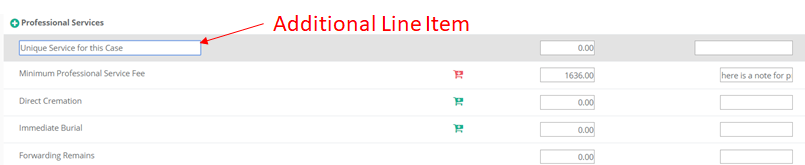
Usually we configure your structure to allow for special headings where you can control line items. Those are Other Service Items and Other Cash Advance Items. You can set those up within the Setup Menu and see more about these at this article. Note- if you are integrating your contracts with QuickBooks the QuickBooks setup screen allows you to define accounting for Other Service Items as a whole and Other Cash Advance Items as a whole. So if you want a Service Item to be hitting a different QuickBooks account then you want us to create a new static line item for you.

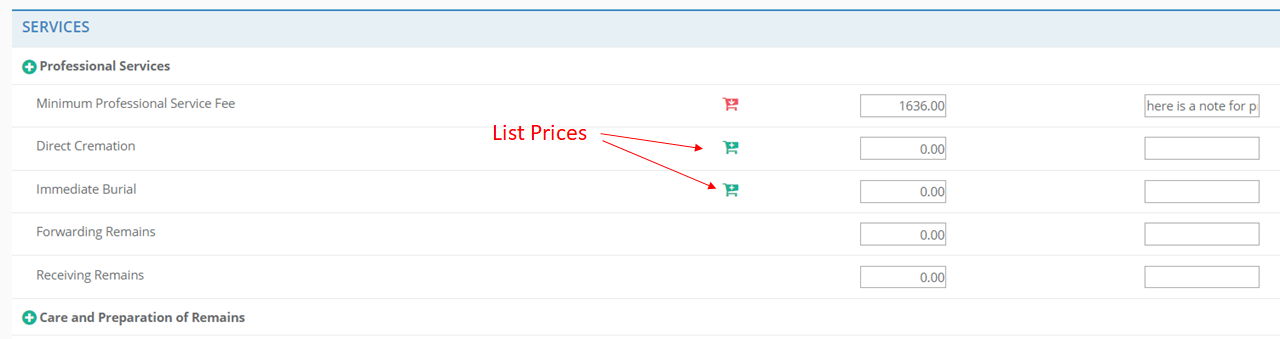
Every Static Line Item can be setup to have a list price defined. This is a good way to manage your General Price List. The shopping cart indicator tells you that there is a list price for that line item. Administrator level users can setup the list prices at Admin > List Price Maintenance. When you select the shopping cart the item and its list price will be added to the case and then you have the option change the price for this case. Keep in mind that if a Price Group is selected for this case then that price group's line items and pricing will override list pricing - but then the resulting prices can be overridden on this case by simply typing over them.
Merchandise Line Items
There are two kinds of merchandise line items- Product Line Items and non Product Line Items. Non Product items behave just line Static Line Items. Only we control them and you can set list prices for them just like above.

Product Line Items are helpful because they allow you to indicate not just that something was sold (ex Urn) but exactly what model of product category was sold. That way you can rely on Halcyon to report on sales and profitability of specific product models.
Product Line Items are actually short cuts to Product Categories. Only we can change your Product Categories (but you can change their description). To setup your products go to the Product Menu (see this article). You can always select the shopping cart to the left of the title and then "walk" your way through the entire product catalog to find the product you want to add to this case. The Product Lines are just short cuts specific to a particular Product Catalog (citation needed).
Halcyon keeps a lot of information about Products, including cost and price. This information is available for reports, forms and statements of goods (aka Contracts). Halcyon has many reports and analytics that report on products. Examples are the Product Averages by Service Type report, Merchandise Sales Summary report and Sales Rollup by Service Type. Those reports do not show details for Static Line Items or Additional Line Items.
You can add additional merchandise line items just like the Additional Line Items described above.
FAQS
Can I avoid having Product Line Items?
Yes. You can sell your merchandise using only non product, static line items. However, you will not benefit from certain reports that only use product categories.
How will the output (aka Statement Goods and Services) be formatted?
Halcyon has many standard contracts available within the forms library. They typically show the line items as is. However, we can easily change the format for you to show all line items or only line items with value. You can make this decision (all lines or only ones with value) for each of the major sections printed (SERVICES, MERCHANDISE, CASH ADVANCE). Furthermore, if you'd like a totally custom contract output it can be formatted almost any way wanted.
How are Price Groups affected by Line Items?
Price groups (aka Packages) use line items just like case contracts do. You can setup a Price Group with its own Additional Line Items. Then when that Price Group is used on a case that additional line item will be added to the case.
You can also set up a Price Group to have a specific Product Item.
Can I setup a Price Group to have an allowance of merchandise?
The Price Group is intended to have its own specific product. However, if you add an Additional Line Item (Ex "Urn Allowance" for $350) then that additional line will come over when the Price Group is added to the case. Note that if you use this method certain sales reports that expect Product Line Items will not reflect that sale unless you then within the case remove the additional line item and replace it with an Urn Product selection.
Comments
0 comments
Please sign in to leave a comment.